

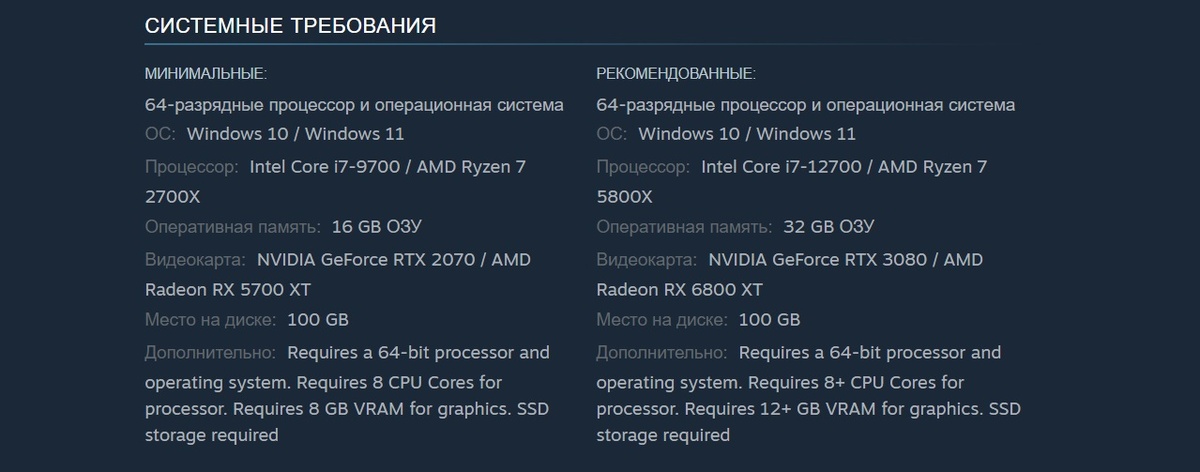
Gearbox and 2K have officially unveiled the PC specifications for the highly anticipated Borderlands 4, detailing both the minimum and recommended hardware requirements. In addition to these crucial performance benchmarks, players can look forward to an extensive array of PC-specific graphics settings and a comprehensive suite of accessibility features, promising a deeply customizable and inclusive gaming experience.
According to 2K, the **minimum PC specifications** are designed to ensure “solid performance on older PC hardware,” broadening access to the game for a wider audience. For those seeking the ultimate visual and performance fidelity, the **recommended PC specifications** are provided, striking an optimal balance between graphical quality and smooth gameplay to deliver “the intended experience for Borderlands 4.”
Difficulty Settings Explained
Borderlands 4 will offer three distinct difficulty levels: Easy, Normal, and Hard. A notable feature is the individual scaling of difficulty in co-op parties, allowing each player to tailor their challenge without affecting others. Below are the descriptions for each difficulty setting:
- Easy: Perfect for players who prioritize story progression. This mode features reduced damage taken and less critical reliance on Elemental Affinities.
- Normal: Designed for a balanced and standard gameplay experience, offering a fair challenge.
- Hard: Geared towards players seeking a demanding challenge. This setting increases damage taken by the player but compensates with enhanced Cash rewards and improved Loot Quality. Elemental Affinities become significantly more impactful.
Minimum PC Hardware Requirements:
- Requires a 64-bit processor and operating system
- Requires SSD for storage
- OS: Windows 10 / 11
- Processor: Intel Core i7-9700 / AMD Ryzen 7 2700X
- Memory: 16 GB RAM
- Graphics: NVIDIA GeForce RTX 2070 / AMD Radeon RX 5700 XT / Intel Arc A580
- Dedicated VRAM: 8 GB (Graphics)
- CPU Cores: 8 (Processor)
- Storage: 100 GB available space
Recommended PC Specifications:
- Requires a 64-bit processor and operating system
- Requires SSD for storage
- OS: Windows 10 / Windows 11
- Processor: Intel Core i7-12700 / AMD Ryzen 7 5800X
- Memory: 32 GB RAM
- Graphics: NVIDIA GeForce RTX 3080 / AMD Radeon RX 6800 XT / Intel Arc B580
- Storage: 100 GB available space
Borderlands 4 PC Graphics Settings:
Basic Settings:
-
General:
- Display Mode: Fullscreen, Windowed Fullscreen, Windowed
- Resolution (Varies by setup)
- Display Stats: None, FPS, All
- Limit Frame Rate: Off, On
- Custom FPS Limit (Varies by setup)
- Vertical Sync: Off, On
- Field of View (ultrawide monitors supported)
- Vehicle Field of View (ultrawide monitors supported)
Advanced Settings:
-
General:
- Graphics Preset: Low, Medium, High, Very High, Badass
- Anti-Aliasing: Disabled, Enabled
-
Resolution Scaling:
- Upscaling Method: Disabled, DLSS, FSR, TSR, XeSS
- Upscaling Quality: Ultra Performance, Performance, Balanced, Quality, Full Resolution
- Spatial Upscaling Quality: Performance, Balanced, Quality, Ultra Quality, Disabled
- Scene Capture Quality: Low, High, Full Resolution
- Frame Generation: Off, On
- NVIDIA Reflex Low Latency: Off, On, Boost
-
Environment:
- HLOD Loading Range: Near, Medium, Far
- Geometry Quality: Low, Medium, High
- Texture Quality: Low, Medium, High, Very High
- Textures Streaming Speed: Medium, High, Very High
- Anisotropic Filtering Quality: Off, x1, x2, x4, x8, x16
- Foliage Density: Off, Very Low, Low, Medium, High, Very High
- Volumetric Fog: Low, Medium, High, Very High
- Volumetric Cloud: Low, Medium, High, Very High
- Shadow Quality: Low, Medium, High, Very High
- Directional Shadow Quality: Low, Medium, High, Very High
- Volumetric Cloud Shadows: Disabled, Enabled
- Lighting Quality: Low, Medium, High, Very High
- Reflections Quality: Low, Medium, High, Very High
- Shading Quality: Low, Medium, High
-
Post-Processing:
- Post-Process Quality: Low, Medium, High, Very High
- Motion Blur Amount
- Motion Blur Quality: Off, Low, Medium, High, Very High
Borderlands 4 Accessibility Features:
Basic Settings:
-
Subtitles:
- Show Subtitles: Off, On
- Subtitle Text Size: Normal, Large, Extra Large
- Force Bold Text: Off, On
- Subtitle Color: White, Orange, Yellow, Pink, Light Blue, Green
- Subtitle Background: Off, On
- Subtitle Background Opacity: Off, Low, Medium, High, Full
-
Speaker Identity:
- Toggle Speaker Identify: Off, On
- Speaker Identify Color: White, Orange, Yellow, Pink, Light Blue, Green
Audio & Visuals:
-
General:
- Menu Text Scaling: Off, Size 1, Size 2
- Damage Numbers: Off, On
-
Audio:
- Force Mono (converts all game audio to mono): Off, On
- Mix Preset: Bass Reduction (Vestibular), Ear Fatigue Reduction, Hyperacusis Relief, Misophonia Relief, Sensory Comfort, Tinnitus Relief General, Tinnitus Relief Targeted, 80 Hz Notch
-
Colors:
- Color Preset (accessibility settings for different types of color vision deficiency):
- Default
- Green/Red (recommended for those that experience Deuteranopia)
- Red/Green (recommended for those that experience Protanopia)
- Blue/Yellow (may help those that experience Tritanopia)
- High Contrast HUD: Off, On
- High Contrast Reticle: Off, On
- Friendly Reticle Color: Green, White/Blue, Red, Blue, Orange, Purple
- Enemy Reticle Color: Green, White/Blue, Red, Blue, Orange, Purple
- Neutral Reticle Color: Green, White/Blue, Red, Blue, Orange, Purple
- Color Preset (accessibility settings for different types of color vision deficiency):
Gameplay:
-
General:
- Map Zoom Speed (Adjust how quickly the Map zooms in and out)
- Enable Vibration: Off, On
- Enable Adaptive Triggers: Off, On
- Screen Shake Intensity
-
Movement:
- Toggle Crouch: Off, On
- Toggle Sprint: Off, On
- Enable Dash: Off, On
- Camera Head-bob
- Grapple View Tilt: Off, On
- Mantle with Forward: Off, On
Regarding post-launch content, Gearbox has outlined its plans for Borderlands 4, which include new Vault Hunters available exclusively with the $130 Super Deluxe Edition. It is currently unclear whether these additional characters will be offered as standalone DLC at a later date. Future content updates will also introduce new storylines, side missions, and “Bounty Packs.” These Bounty Packs, included in both the Deluxe and Super Deluxe Editions, promise new areas and missions culminating in unique boss encounters and opportunities to earn rare loot.
Borderlands 4 is set to launch on PC, PlayStation 5, and Xbox Series X|S on September 12, with a Nintendo Switch 2 edition expected to follow in early October.